 Powered by Humaniser
Free Humanizer Online for any device
Free Humanizer Online sends your AI draft from any phone, Chromebook or laptop to Humaniser, which rewrites it as natural, undetectable writing.
Opens in Humaniser. Free: 3 humanizations a day, up to 200 words each, no signup. How your text is handled
Humaniser's free plan gives you 3 humanizations a day of up to 200 English words each, with no account or card. On shared networks such as schools or offices, Humaniser may ask you to create a free account. Paid plans start at $5 a month billed yearly, or $10 billed monthly, and add more words per run and other languages.
Continue in Humaniser sends your text to humaniser.com, run by Humaniser LTD, and opens it in Humaniser's editor. Humaniser keeps that copy for at most 10 minutes, deletes it once the editor has loaded it, and never puts it in a web address. See Humaniser's privacy policy.
Built to bypass leading AI detectors


 Originality.ai

 ZeroGPT



How it works
Step 1: Copy the AI text
Use the copy button under the reply in your AI chat app, or select one section of your doc.
Step 2: Paste it here
Long-press and tap Paste on a phone, or press Ctrl+V, then press Continue in Humaniser.
Step 3: Humanize, then paste back
Press Humanize, check it with Detect AI, then paste it where you were writing.
Your text opens in Humaniser
Continue in Humaniser opens this editor on humaniser.com with your text already in it, on a phone as on a laptop. Humaniser publishes a 99.8% detector bypass rate.
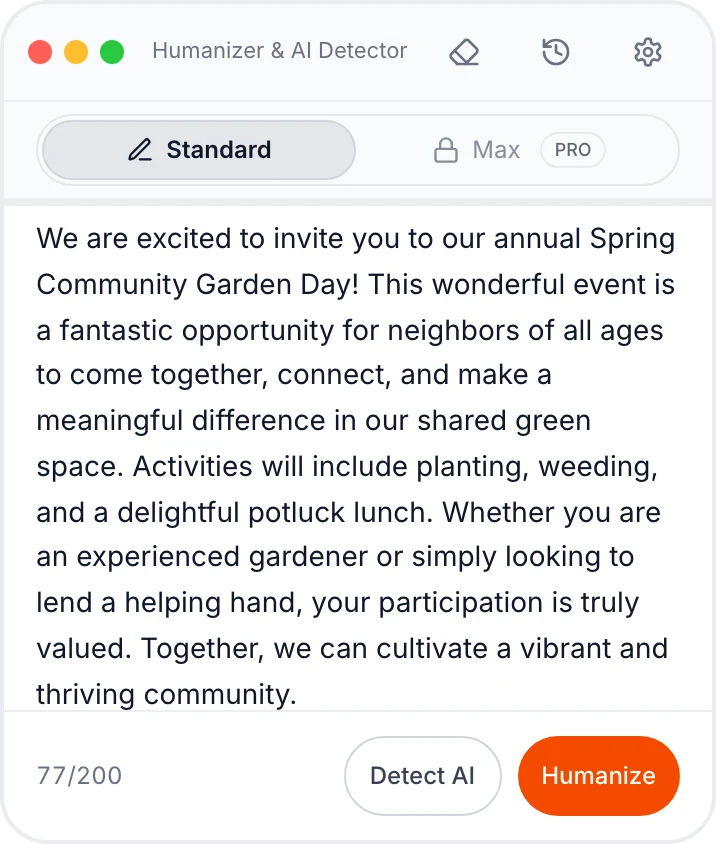
Already in the editor
The text you sent is waiting there, so there is nothing to paste twice.
The free word counter
It tracks the free plan: up to 200 words a run, 3 runs a day.
Humanize, then Detect AI
Rewrite with one tap, then score the result with the built-in detector.
Works where you write
The move that gets text out of each place, and the one that puts the result back cleanly.
iPhone or Android
Copy out: Tap the copy icon under the AI reply, or long-press and choose Copy. Long replies go in one or two paragraphs at a time.
Paste back: Copy the result in Humaniser, then long-press in your app and tap Paste.
Chromebook
Copy out: Select the text and press Ctrl + C. Search + V brings back any of your last five copies.
Paste back: Ctrl + Shift + V pastes it as plain text.
Google Docs
Copy out: Select one section and press Ctrl + C (⌘ + C on a Mac).
Paste back: Ctrl + Shift + V over the old section, then reapply headings.
Microsoft Word
Copy out: Copy one section of up to 200 words.
Paste back: Ctrl + Shift + V (⌘ + Shift + V on a Mac) pastes text only.
PDF files
Copy out: Copy the text, then join the lines it broke mid-sentence.
Paste back: Paste into your document as plain text.
Chat replies with markdown
Copy out: Delete the ** and # symbols before you paste.
Paste back: Reapply headings, bold and links in your document.
Device and app guides
Step-by-step help for the phone, laptop or app you write in.
| Guide | What you'll learn | Time to read |
|---|---|---|
| How to humanize AI text on your phone | Paste on iPhone or Android, copy text out of AI apps and screenshots, and add a home-screen icon. | 6 min read |
| How to use an AI humanizer on a Chromebook | Use one Chrome tab, the five-item clipboard menu, and what a school-managed Chromebook can block. | 5 min read |
| How to humanize AI text in Google Docs | Send one section at a time, paste back without formatting, and check every change with Compare documents. | 6 min read |
| How to humanize AI text in Microsoft Word | Paste back as text only on Windows, Mac or the web, and review edits with Track Changes or Compare. | 5 min read |
| How to humanize AI text in PowerPoint and Google Slides | Pull slide text out with Outline view, humanize speaker notes, and fix text that overflows. | 6 min read |
| How to keep formatting when you humanize text | What survives the trip to Humaniser, how to strip markdown fast, and the order to restore styles. | 5 min read |
| How to humanize text from a PDF | Fix broken lines and split words, open PDFs in Word or Docs, and handle scanned pages. | 6 min read |
Frequently asked questions
What is Free Humanizer Online?
Free Humanizer Online (freehumanizeronline.com) is a web page owned and operated by Humaniser LTD. It sends the text you paste, from a browser on any phone, tablet or computer, to Humaniser's editor on humaniser.com, where the humanizing happens. This site never rewrites text itself.
Do I pay anything to use it on my phone or laptop?
No. You get 3 free runs a day in Humaniser, 200 English words per run, with no account and no card. On school or office Wi-Fi, Humaniser may ask you to make a free account before your first run.
Can I keep it on my home screen like an app?
Yes, with no app to download: in Safari, tap Share and then Add to Home Screen, and in Chrome on Android, tap More ⋮ and then Install and create shortcut. The icon simply opens this page. On a Chromebook or laptop, a bookmark does the same job.
Where does my text go when I press Continue in Humaniser?
Your browser posts it over HTTPS to humaniser.com inside the form, so it never appears in a web address or your history. Humaniser keeps that copy for at most 10 minutes and deletes it as soon as its editor loads it. The privacy page lists the cookies and logs involved.
Will bold, headings and links come through?
No, only the words and line breaks make the trip, because both boxes hold plain text. Paste the result back as plain text, then restore headings first, then bold, then links.
How can I see exactly what Humaniser changed?
Keep a copy of the original first. In desktop Word, Review > Compare marks every changed word, and turning on Track Changes before you paste back marks the section you replaced. In Google Docs, Tools > Compare documents shows the differences as suggested edits.
Can I humanize a long Google Doc or a PDF?
Yes, one section at a time: the free plan takes up to 200 English words per run, 3 runs a day. Copy two or three paragraphs, join any lines a PDF broke, and paste each result back before you copy the next part.
Can it bypass AI detectors?
The rewriting happens in Humaniser, where your text opens. Built to bypass GPTZero, Turnitin, Originality.ai, Copyleaks, ZeroGPT and other AI detectors. Humaniser has a built-in AI detector, so you can check your score before you submit.
Other questions: support@humaniser.com
Paste from any phone or laptop
Add this page to your home screen or pin the tab, then paste your next draft at the top.
Paste your textFree in Humaniser: 3 humanizations a day, up to 200 words each, no signup.